Release notes
FastTrack Automation Studio 15.0 - January 1st 2024
Download version 15.0
FastTrack Automation Studio 14.4 - March 10th 2023
- Fixed TLS 1.2 issue preventing Azure AD signatures and scripts to validate.
Download version 14.4
FastTrack Automation Studio 14.3 - December 5th 2022
- Fixed issue where signature not working with recent Office updates
- Rounded corners on Windows 11
Download version 14.3
FastTrack Automation Studio 14.2 - March 11th 2022
- Fixed issue where signature changes in the pop-up form were ignored with Azure AD attributes
- Various improvements in the editor
Download version 14.2
FastTrack Automation Studio 14.1 - April 19th 2021
- The editor now does full font scaling instead of bitmap scaling the same way as the runtime
- New condition: Server2019 and BitLockerEnabled
- New functions: CollectionItemAt and CollectionSize
Download version 14.1
FastTrack Automation Studio 14.0 - November 30th 2020
Version 14.0 does font scaling of the runtime. In earlier versions, the runtime was bitmap scaled.
Example new runtime form:
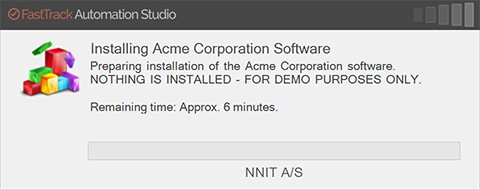
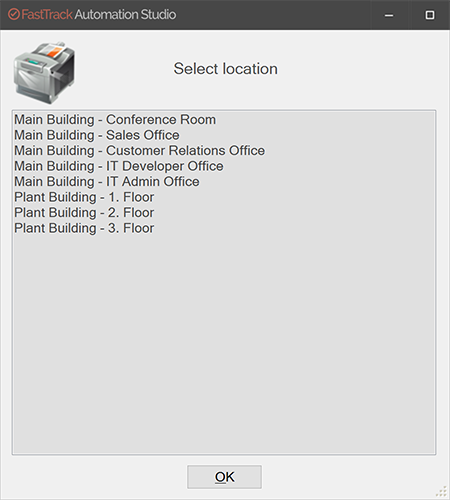
Download version 14.0
FastTrack Automation Studio 13.0 - January 22nd 2020
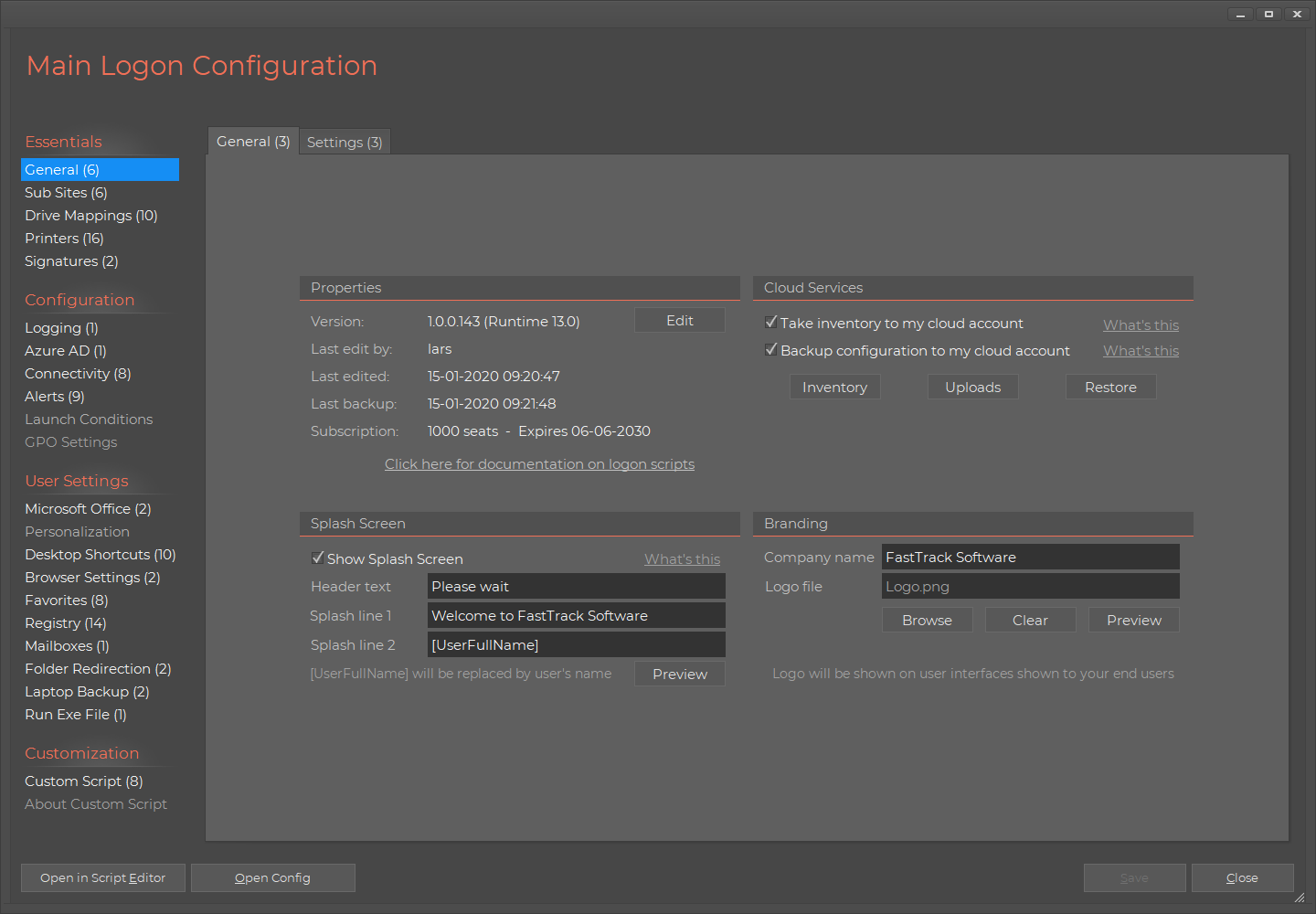
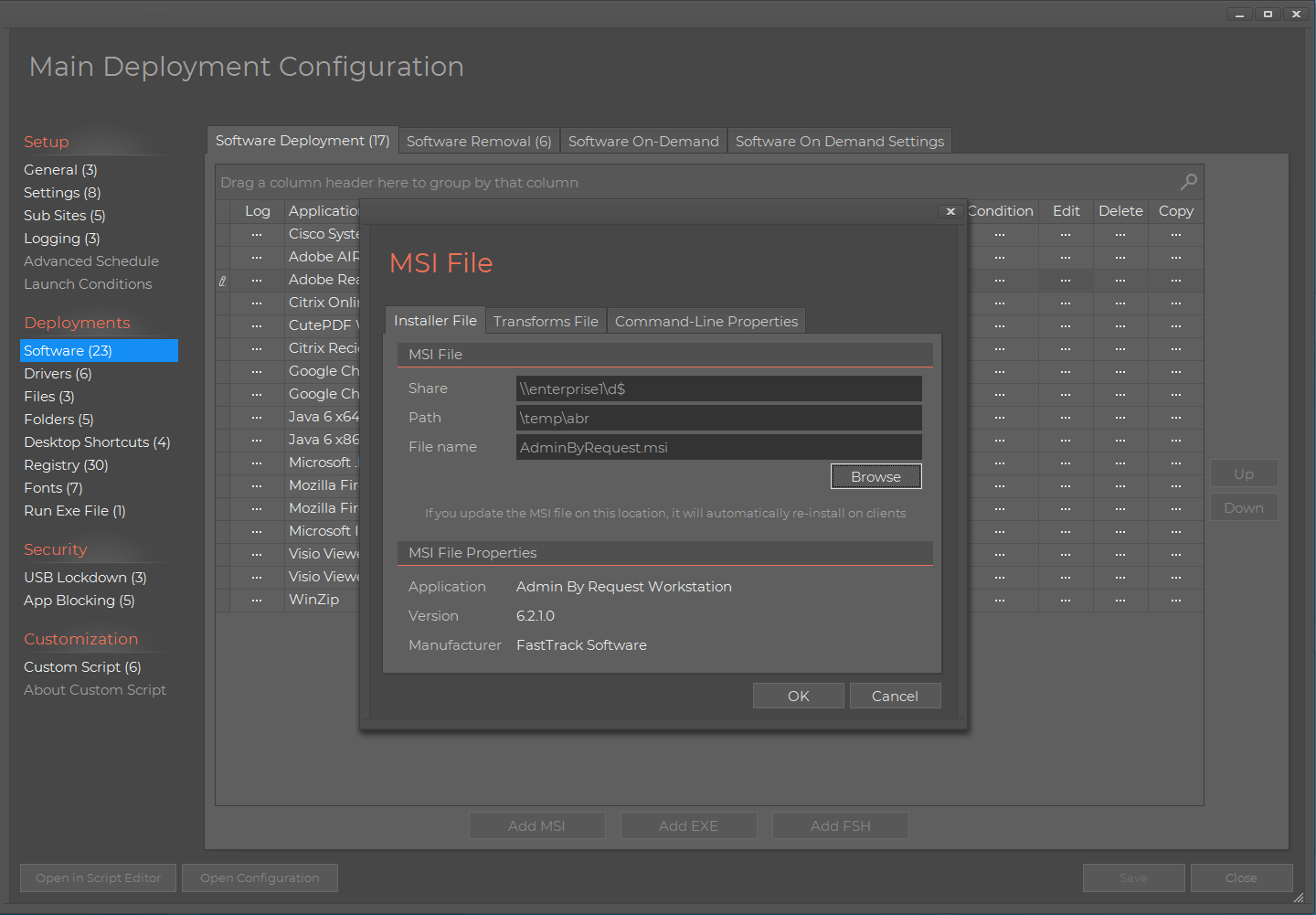
Version 12.0 was a rewamp of all user interfaces in the runtime. Version 13.0 is a total rewamp of all modules and wizards in the studio on the admin pc.
Note that if you need to open a support ticket, there is now a direct link to do so on the home screen.
Logon script builder:
|
Software deployment:
|
Download version 13.0
FastTrack Automation Studio 12.3 - May 10th 2019
- Connectivity in the Logon Script builder has idle logoff feature. If the user is not active for a configurable number of minutes, the session is logged off. Idle logoff works both for desktop and remote sessions.
- Connectivity in the Logon Script builder has new nightly forced logoff feature for desktop sessions.
- The small splash screen has new Windows 10 style wait spinner.
- General runtime speed optimization for logon scripts.
- New commands in the core language: FileCertificateName, FileCertificateIssuer, SetFileEncoding and OneDriveURL
- Design update in home screen modules. Refer to this page for example screenshots.
Download version 12.3
FastTrack Automation Studio 12.2 - June 12th 2018
- New Software On Demand feature in Software Deployment, where a picklist of software can be set for users to pick software to install from.
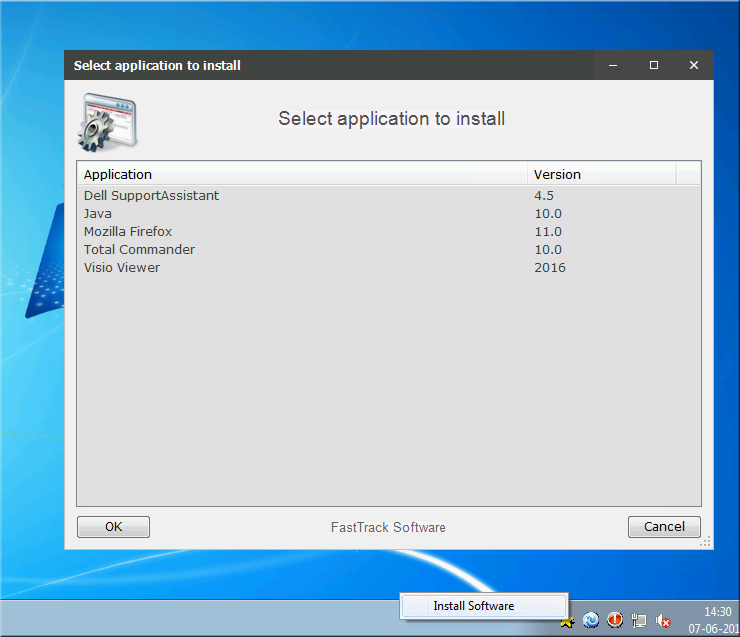
- Option to add a tray icon to rerun the logon script in the Logon Script Builder.
- New commands in the core language to put script and exe files in the system tray: RunTrayScript, RunTrayExe, InstallTrayScript, InstallTrayExe, UninstallTrayItem, UninstallAllTrayItems, InstallUserTrayScript, InstallUserTrayExe, UninstallUserTrayItem andUninstallAllUserTrayItems.
Download version 12.2
FastTrack Automation Studio 12.1 - May 7th 2018
- Software Deployment can now deploy software based on user groups or user OU.
- Software Deployment can now deploy software down to every minute instead of a minimum of 15 minutes. This is especially useful during testing.
- SkyBox inventory now collects and shows Windows 10 build and release numbers.
- In custom scripting these new Windows 10 attributes can be used through the new functions OperatingSystemBuildNo, OperatingSystemBuildUpdateNo and OperatingSystemReleaseNo.
- Logon script speed improvements when used with RemoteApp.
- Generic "Run Exe File" left menus to run anything in Logon Script builder and Software Deployment builders.
- A custom size can now be set for the Codes of Conduct screen in the logon script builder.
- New core commands: RevertUser and ChangeUserName. New condition: IdleFor. New functions: IdleSeconds, IdleMinutes and LastExitError. The idle functions are used to determine, if the user did not move the mouse or press the keyboard for a certain period of time.
Download version 12.1
FastTrack Automation Studio 12.0 - December 4th 2017
Version 12 is a total rewamp of all user interfaces, both in the studio and in the runtime.
Please flush your browser cache before using any of the links.
- Users will now see a new look and feel (Modern skin). All the blue screens are now replaced by flat design screens inspired by Windows 10. You can opt to continue to use the legacy blue skin, if preferred. Refer to the User Interface page for more screenshots of the Modern skin.
Splash screen with new skin (Modern):
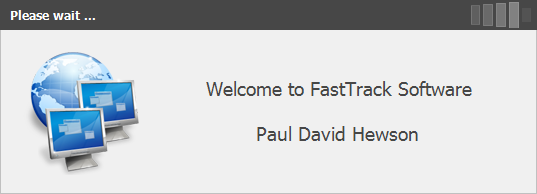
|
Progress command with new skin (Modern):
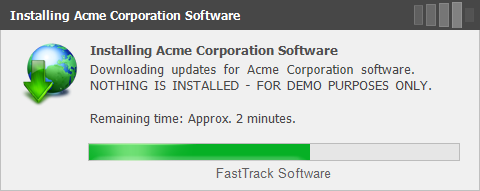
|
Splash screen with legacy skin (Classic Blue):
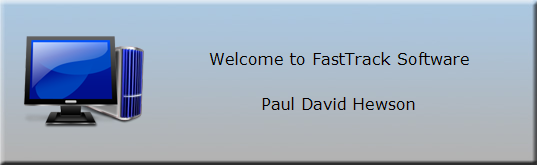
|
Progress command with legacy skin (Classic Blue):
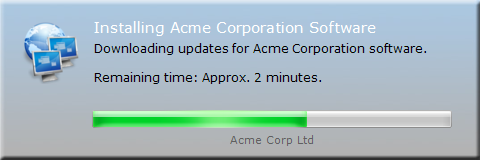
|
- The Studio itself is updated with new user interfaces inspired by Windows 10. Refer to the front page here for examples from the Logon Script and Software Deployment builders. The Script Editor also has a new Windows 10 inspired default skin.
- The App Factory has been discontinued and is replaced by a new Windows 10 tile-style inspired Home Screen that looks like this:
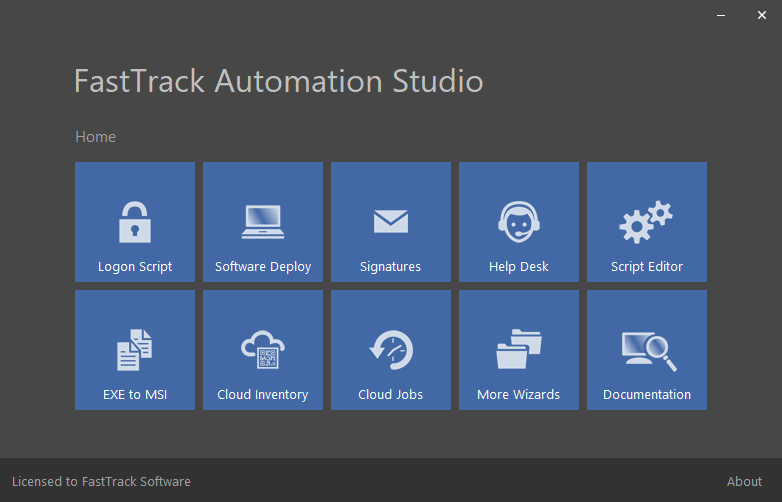
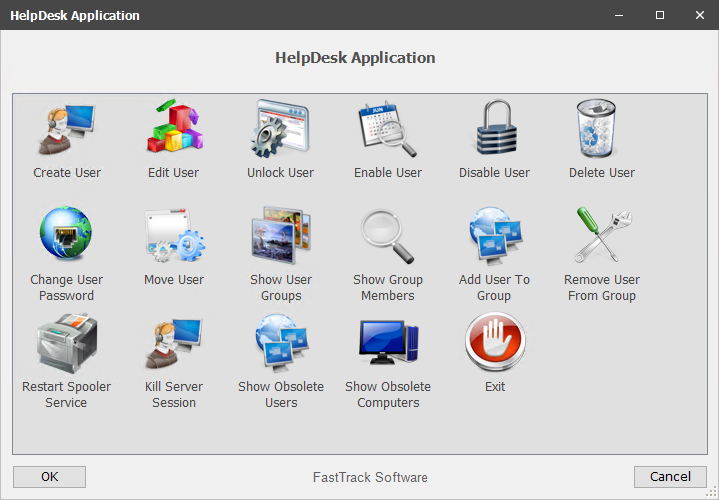
- The Help Desk App wizard now includes the two report examples obsolete user and computer accounts, shown here. The updated Help Desk App with the new Modern skin, looks like this with all options selected:
- A checkmartk option to revert to the legacy Classic Blue skin is added to the general page of the Logon Script Builder. To change the skin back in custom exe files or other scripts, use the new commands SetSkin, SetDefaultSkin (machine level) or SetUserDefaultSkin (user level).
- The Help Desk App base script was improved, for the scenario, where it is used as a template for own scripting with the Script Editor.
- New SetWaitCaption command to set the caption that is shown on Splash, SmallSplash, Progress and SyncDir commands.
- New Folder Redirection option in the Logon Script Builder for scenarios where user files are already in the target location, which speeds up logon time. From custom scripts, these new commands are added: SetUserFolderReassign, RestoreUserFolderReassign, SetSystemFolderReassign and RestoreSystemFolderReassign.
- The Logon Script setup wizard was redone to make the process of setting up logon scripts the first time simpler.
- The cloud inventory now uploads a snapshow of the administrators group that will appear as a new tab in your SkyBox Inventory.
- The cloud inventory now remembers the last user that logged on, when the cloud inventory is used with Software Deployment, instead of the user appearing as "system" or similar.
Download version 12.0
FastTrack Automation Studio 11.3 - September 25th 2017
- Connection of OneDrive and SharePoint as a drive letter now works without user interaction, when used with ADFS (Active Directory Federation Services) or PTA (Pass-Through Authentication). Refer to this page for documentation on OneDrive drive mapping.
- Software Deployment and Logon Script Builders are reorganized and speed optimized.
Download version 11.3
FastTrack Automation Studio 11.2 - August 28th 2017
- New automatic cloud backup service embedded directly in the logon script buider, software deployment builder, signature builder and the Script Editor. This is a free backup service for all customers with active licensing. Refer to this page for documentation on the new cloud backup feature.
- Property pane in the Script Editor to show script properties and cloud backup data.
- Custom ADMX Group Policy file to set logon script policies. Existing customers can get it under "GPO Settings" in the logon script builder in the Home Screen.
- New core commands Encrypt and Decrypt to encrypt and decrypt anything using a private key, such as for encrypting and decrypting a disk file.
Download version 11.2
FastTrack Automation Studio 11.1 - April 24th 2017
- All built MSI files can now be executed as a regular user and will seamlessly elevate during install instead of denying execution showing the message "The installation cannot execute, because administrative permissions and UAC elevation are required".
- Software Deployment can now work in domain-less environments authenticating against a generic share, like a NAS box on the network.
- New animated wait icon is shown when using SyncDir, SmallSplash and Progress windows.
- Software Deployment and Logon Script Builders are reorganized and speed optimized.
- Both Software Deployment and Logon Script Builder can now do all registry operations: Add/remove both keys and values and both for 64 and 32 bit registry. They can also both import .reg files.
- Software Deploy can now install and uninstall fonts, copy files and folder structures.
- Software Deploy has uninstallers for drivers and desktop shortcuts.
- Logon Script Builder can now remove obsolete desktop shortcuts and favorites.
- Restart button added to SharePoint and OneDrive logins, in case the user clicks links and can't get back to the login page.
- Logon Script Builder and Software Deploy can now scale down to lower resolutions.
- New /SignatureDesigner and policy settings for starting the Signature Designer without starting the full studio.
- New core language commands to install and remove fonts: InstallFont and UninstallFont.
- New registry commands: WriteRegistryValue, WriteRegistryValuex86, WriteRegistryBinaryValue, WriteRegistryBinaryValuex86. These are added for syntax consistency instead of using the WriteRegistry and WriteRegistryBinary commands.
- Other new core language commands: AuthenticateShare, DeleteDesktopShortCut, DeleteUserDesktopShortCut, DeleteUserFavorite and DeleteShortcut
Download version 11.1
FastTrack Automation Studio 11.0 - January 30th 2017
- Software Deployment massively updated with new features making it even easier to deploy software. Refer to this page for more information.
- Drivers can now be deployed using the software deployment system or installed from scripts. Refer to this page for more info on deploying drivers using software deploy.
- Support for meeting signatures and vcards through a new Outlook Add-In that the engine exe will automatically install in Outlook, when using the features. Refer to this page for more information. Note that vcards built by the new FastTrack Outlook Add-In are considerably richer than the ones Outlook itself builds and it also takes corrections from the signature pop-up into account.
- The Help Desk App wizard now includes the feature to restart the spooler service on remote computers and kill sessions on servers. Refer to this page for more information.
- Software Deployment wizard now support command-line properties and MST transforms files when adding an MSI file.
- Software Deployment has software installation policies for minimum free disk space and laptop battery policy. A new core command SetInstallMinimumFreeDisk can be used to manually control the disk space threshold.
- Software Deployment can build a one-time installer, which is useful for OS deployments or startup script based software deployment. Refer to this page for more information.
- Software Deployment and Logon Script Builder have a lot of new conditions for manufacturer, model, os bit and versions. Manufacturer and model are useful to deploy drivers to certain makes and models of clients only.
- The network banner feature in outlook signatures now supports start and expiration dates for showing the banner.
- All user interfaces now supports inline hyperlinks used in text. This applies to all commands that have a body text, such as the ShowMessage or Progress commands.
- The "custom script" menu in the Logon Script and Software Deployment wizards now have full editing capabilities, as the Script Editor has. Features are such as context helper, engine browser tree, syntax validation on save, code completion, auto indentation, etc.
- Logon Script and Software Deployment now shows a box, when UAC elevation is required. Clicking it will restart the studio in admin mode (UAC elevated) to avoid making a lot of changes and not being able to save.
- Logon Script builder can now set wallpaper and screen saver.
- New /q and /dm switches for the engine to run scripts in complete stealth mode, ignoring any user interfaces that would pop up as part of execution. These can also be controller by new commands: EnableStealthMode, DisableStealthMode, EnableUserInteraction and DisableUserInteraction.
- The SetUserImage command to set Active Directory photos can now scale images before saving the image to Active Directory.
- Runtime errors are now always saved to an error log file in the temp directory, because users logging on may not be able to write errors to the event log for error tracking.
- In the core language meeting signatures and vcards can be controlled using new commands: SetMeetingSignature, ClearMeetingSignature, GenerateVCardFile, EnableSignatureVCard, DisableSignatureVCard, EnableNewEmailVCard, DisableNewEmailVCard, EnableReplyEmailVCard and DisableReplyEmailVCard. The new Outlook Add-In that is used to support the features, can be manually uninstalled using a new UninstallOutlookAddIn command. When using the features in a logon script, the Outlook Add-In will automatically install and uninstall as required.
- New core language commands for drivers: InstallDriver, PreinstallDriver and UninstallDriver. Also a DriverPath function and a DriverInstalled condition are added. Refer to the OS deployment page for an example of using them as part of OS deployment.
- New command CreateEventSource to create sources in the event log, so ordinary users can write to this event log source without admin rights.
- New BatteryRemainingPercent and BatteryRemainingMinutes functions to check laptop battery status.
- New SetTimeOut command to set a timeout for all commands starting with "Run" to avoid waiting forever in case of problems. An error code can be set to determine the timeout.
- New commands to set screen saver settings: SetScreenSaver, RemoveScreenSaver, SetScreenSaverTimeout, EnableScreenSaverLogonScreen and DisableScreenSaverLogonScreen.
- New commands to scale and convert images: ScaleImageFile and ScaleImageFileConvertImageFile.
- Number of commands in the core scripting language now passed 1500! Other new core engine features: RestartService command, FileNameWithoutExtension function, SetTime command, ServerTime function, ManufacturerIs condition, ModelIs condition and IPAddressChanged condition.
Download version 11.0
FastTrack Automation Studio 10.6.1 - Released October 28th 2016
- Logon scripts now ignore all modal user interfaces, when the logon script runs under RemoteApp, such as the window that asks for Outlook signature information or a message box. This avoids RemoteApps stalling at startup waiting for a logon script that never finishes, because the user cannot see the logon script.
- Launch conditions now include support for RemoteApps. This means you can completely disable logon script execution entirely on RemoteApps. A new core language conditon "RemoteAppSession" is also added.
- New Windows2016 condition. All launch condition pages in wizards have a new Windows 2016 checkmark option to disable executions on Server 2016.
- New Remote Desktop Services Session application to kill disconnected RDS sessions. Refer to www.fasttrackscript.com/sessionterminator for more details.
- Company logos now stretch in all user interfaces. If your logo is wide, all user interfaces will be slightly wider to make room for a wide logo. Instead of the logo shrinking in height, it will now be wider. A menu of a width of 500 pixels can now grow to be up to 532 pixels wide, to make space for a wider logo.
- Signatures can now use logical tags instead of FastTrack functions. For example [Display Name] (name as it appears in Active Directory) instead of [UserFullName] (FastTrack function). Both can still be used, but when inserting a new attribute in the signature designer, the logical name will now be inserted, making the signature contain tags that are the same as Active Directory instead of FastTrack functions.
- In the signature builder, there is now a new button named "Config". Here you can completely customize the pop-up window asking for Outlook Signature information, such as changing headers and captions and translate all fields to local language.
- Logon Script Builder has preview buttons for splash screens, logos, printer menus and user alerts.
- New core commands: Stop, EnableSimpleLogging, DisableSimpleLogging and InstallMSP.
- New function "SessionID" to convert a username to a session id of a logged on user.
Download version 10.6.1
FastTrack Automation Studio 10.6 - Released September 28th 2016
- New Outlook Signature banner feature to dynamically include rotating banners in signatures. Refer to www.outlooksignatures.com for more details.
- New Social Media icon button to add the official logos of social media to signatures. Refer to www.outlooksignatures.com for more details.
- Significant improvement in Outlook signature install speed in logon scripts.
- New schedule tab in Software Deployment Builder to exclude software distribution on certain days or timeframes.
- SmartDock LAN detection improved. SmartDock will automatically update, when saving from the Logon Script Builder.
- Logon Script Builder option to ask user to correct AD values can now be done in intervals, for example asking users to modify signature values once a month.
- New day conditions: Monday, Tuesday, Wednesday, Thursday, Friday, Saturday and Sunday.
- New commands to install signatures once in one single commands: InstallDefaultNewSignature, InstallDefaultNewSignatureOnce, InstallDefaultReplySignature, InstallDefaultReplySignatureOnce and EnableSignaturePromptOnce.
- New condition SharePointLoginCancelled to determine, if SharePoint or OneDrive login was cancelled.
Download version 10.6
FastTrack Automation Studio 10.5 - Released August 8th 2016
- Logon Script Builder can connect SharePoint and OneDrive folders as drive mappings. New core engine commands to connect from scripts: ConnectSharePoint, ConnectSharePointPersistent, ConnectOneDrive and ConnectPersistentOneDrive.
- Logon Script Builder and Outlook Signature Wizard can lock Outlook stationery settings. New commands: LockStationery and UnlockStationery.
- Logon Script Builder has simple group check option on share connections, to speed up logon script time.
- New commands to set a default company logo appearing on all user interfaces: SetCompanyLogo, SetDefaultCompanyLogo and SetUserDefaultCompanyLogo. Logon Script Builder now uses these.
- Logon Script and Software Deploy Builders can use multiple conditions.
- Software Deploy Builder has subsites like Logon Script Builder.
- New scaling of all user interfaces, which can be configured in Logon Script Builder. If it is a preference to make splash screens, menus and other user interfaces bigger, this setting can be set to for example 125%. New commands: SetScaling, SetDefaultScaling and SetUserDefaultScaling to do the same.
- When installing Outlook signatures, Outlook is changed to default HTML format, if it is set to plain text.
- IP address functions excludes known loopback scopes.
- Outlook signature version added in Logon Script Builder to be able to update signatures installed using the once functionality.
- SmartDock and SmartConnect can rerun logon script at night on computers/sessions not logged off.
- New function UserAssistantPhoneNo and command SetUserAssistantPhoneNo to get or set user's assistant phone no.
- New commands InstallSignatureOnce and InstallDefaultSignatureOnce, which Logon Script Builder now uses. This is a once command and signature install in one command, so ensure that the signature does install once.
- New conditions for better syntax: PrinterLocationSelected, ComputerDomainIs, UserDomainIs, UserPrimaryGroupIs and ComputerPrimaryGroupIs.
- The studio can be started directly as a log viewer and policies can be set to disable features in the studio, such as logon script or software deployment editing. Start the script editor exectuable (editor.exe) in the installation directory using the /? parameter to see switches and policy registry keys.
Download version 10.5
FastTrack Automation Studio 10.4 - Released July 6th 2016
- Logon Script Builder now splits logon scripts into two parts, deferring non time-critical tasks (such as connecting printers, taking inventory or purging of temp files) to after Explorer start. This greatly improves logon time. It takes effect next time the logon script is saved from the builder.
- SmartDock and SmartConnect can now rerun the entire logon script at reconnection. This can be configured from the Logon Script Builder. The Logon Script Builder will automatically update SmartDock and SmartConnect on save.
- New advanced logging, allowing logging of log offs, laptop standby/resumes and RDP connection/disconnection. This can also be configured from the Logon Script Builder.
- Software Deploy Builder can block EXE files, preventing users from starting for example Dropbox, Spotify, Skype, Windows Installer in general or a specific browser.
- Software Deploy Builder can lock down USB drives and other media devices.
- Backup buttons in Logon Script Builder and Software Deploy Builder.
- Logon Script Builder can set Word, Excel and PowerPoint default save paths.
- Logon Script Builder and Software Deployment Builder have copy buttons on all sub-menus to easily duplicate for example a printer or site.
- Logon Script Builder and Backup Wizard can now also backup desktop, favorites, music, pictures and videos folders. Before it could only backup documents folder.
- Logon Script Builder has intervals for showing Codes of Conduct.
- More fields added to general logging: IP address, host, type and make/model of the computer.
- Log viewers greatly improved.
- New language commands for blocking USB devices: BlockDevices, UnblockDevices and SetDevicesReadOnly.
- New language commands for blocking EXE files permanently: DisableExecution, EnableExecution and ClearExecutionDisabling.
- New language commands for setting Microsoft Office save paths: SetOfficeSavePath, SetWordSavePath, SetExcelSavePath, SetPowerPointSavePath, EnableOfficeCloudPreference and DisableOfficeCloudPreference.
- New function AzureUserCustomProperty to use a custom Azure AD property.
- New functions LogonScript and Hostname to get the last executed logon script and the host name of an IP address.
- Speed improvement in collections AllUsers, AllComputers, AllGroups, AllOUs, GroupSubGroups, GroupComputers and GroupUsers.
Download version 10.4
FastTrack Automation Studio 10.3 - Released June 2nd 2016
- Support for IP printers. Refer to this page for more information.
- Logon Script Builder can now split into sub sites. For example, if there are 4 sites in a company, the logon script can be split into 4 sub-logon scripts.
- Logon Script Builder has option to create desktop icon for users to re-run the logon script without having to log off and on.
- New commands to support IP printers: ConnectIPPrinter, ConnectIPPrinterAsDefault, DisconnectIPPrinter and InstallPrinterDriver.
- New commands to set timeout on messages and questions: SetAskTimeout and SetMessageTimeout. If a user does not respond to a message or question within this time, the default button is automatically pressed to avoid stopping execution. The OK button will say "OK (6)" when there is 6 seconds left and will count-down.
- New commands for simpler installation of SmartDock and SmartConnect: InstallSmartDock, InstallSmartConnect, UninstallSmartDock and UniInstallSmartConnect.
- New commands to identify current execution location: CurrentScriptFile, CurrentRootScriptFile, CurrentRootScriptPath and CurrentRootScriptName.
- SetUserCustomProperty, SetComputerCustomProperty, SetGroupCustomProperty and SetOUCustomProperty commands can set multiple values for multi-value AD attributes.
Download version 10.3
FastTrack Automation Studio 10.2 - Released April 6th 2016
- FastTrack Automation Studio can now deploy software without writing any script lines, using a new "Software Deploy" option in the Home Screen. Refer to this page for more information.
- Logon Script Builder can now show a log of runtime errors for logons.
- Logon Script Builder has behavioral settings for default printer, for example not setting the default printer, if the user has a local printer. The new SetDefaultPrinterMode command can do the same in a script.
- Logon Script Builder will automatically update the FSH.Exe on the netlogon share, when a new version is installed on the admin computer.
- The engine has now passed 1400 commands. New simple "Log" command lets you log anything to a log file and it will automatically add date, time, user, computer and operating system. The log file is set by the new SetLogFile command, which can also set a maximum log file size, where the Log command automatically truncates the log file by 20%.
- New EnableErrorLogging, DisableErrorLogging, EnableInstallLogging and DisableInstallLogging commands. You have always been able to put an ErrorHandler.fsh and/or PostInstall.fsh script in the same directory as the fsh.exe file and get those executed automatically. These commands will use the above generic logging automatically, when an error occors or software is installed. You can still use the files for, for example, custom logging or taking inventory to your management system after installs.
- New SetMaxConcurrentInstalls command. Using this command allows you to set a limit on how many computers installs any software at the same time (InstallMSI, InstallMSIBasic, InstallProgram and InstallProgramScript commands) using a central XML file to control concurrent installs.
- InstallMSI and UninstallMSI commands are now intelligent. InstallMSI will only try to install the MSI file, if the exact same product and version is not already installed (as it would fail anyway). This allows you to just fire the InstallMSI command any number of times without regard to, whether the product is already installed or not. The same is true for UninstallMSI, where the exact same product has to be installed.
- New InstallProgram, InstallProgramScript and UninstallProgramScript commands to run an installation exe file or script. The reason you would want to use those instead of just using the Run command is that these will automatically apply concurrency and install logging rules.
- New EnablePrintRestrictions and DisablePrintRestrictions commands. These will in enable or disable printer driver restrictions for users.
- New CreateDesktopShortCut command. This command is just for improved readability in scripts, as this could be done using the existing generic CreateShortCut command.
- More new interval functions: OnceASecond, OnceAMinute, OnceAnHour and UserOnceAnHour.
- New functions to get information from MSI files, reading the internal metadata of the MSI file: MSIFileProductCode, MSIFileProductName, MSIFileVersion, MSIFileVersionMajor, MSIFileVersionMinor and MSIFilePublisher.
- New MSIFileInstalled installed condition. This allows you to do or not do something in a script, if the MSI file you point to, is already installed, meaning exact same product and version.
Download version 10.2
FastTrack Automation Studio 10.1 - Released March 3rd 2016
- Major update to the Logon Script Builder. Menu is now to the left and most pages are revamped. Refer to www.fasttracklogon.com for screenshots.
- Logon Script Builder can now handle multiple signatures and multiple mailboxes based on conditions, such as group checks.
- On the general page of the Logon Script Builder, it is now possible to execute and/or debug the script directly from the builder. It is also possible to set error/resume mode and/or debug mode for all clients for temporary troubleshooting.
- On the general page, it is also possible to set/overrule the company name used and include a company logo that will automatically be resized to fit splash screen, menus, etc.
- New version check page. The logon script can check for version of Citrix Receiver, SCCM Client, Microsoft Office and the Operating System itself. Logging and messaging to the user is possible, if either the version is too low to be supported by IT or is not installed.
- Logon Script Builder can also set registry keys and proxy bypass rules.
- Images for splash screens, menus and so forth no longer need to be resized generally, when using commands such as Splash or AddCustomIcon. The engine automatically resizes graphics and icons to fit. The internal resizer is at par with Photoshop and other photo apps.
- New syntax for uniquely identifying OUs without specifying full distinguished name for all OU related commands and functions. For example an OU "Sales" under a root OU "America" would have a distinguished name of for example OU=Sales,OU=America,DC=ACME,DC=COM, but can now be located by simply using America/Sales instead of full distinguished name.
- New commands: EnableProxyLocalAddressBypass, DisableProxyLocalAddressBypass, SetProxyBypassAddresses, AddExchangeMailbox, AddExchangeMailboxForced, StopResumeOnError, EnableDebugMode (from scripts) and DisableDebugMode.
- More commands for setting AD user properties without using the SetUserCustomProperty command: SetUserCity, SetUserCountry, SetUserFaxNo, SetUserHomePhoneNo, SetUserIPPhoneNo, SetUserManager, SetUserMobileNo, SetUserNotes, SetUserPagerNo, SetUserPOBox, SetUserState, SetUserStreet, SetUserTitle, SetUserWebPage and SetUserZip.
- New functions: WordPath, ExcelPath and OutlookPath. Useful for shortcuts and other situations, where an Office exe location is needed.
- Script builder can now browse for shares and printers.
Download version 10.1
FastTrack Automation Studio 10.0 - Released February 4th 2016
- Major update to the Logon Script Builder. Refer to www.fasttracklogon.com for screenshots.
- New tablet and laptop conditions in core language.
- All Home Screen wizards can differentiate launch conditions for tablets.
- Language improvement: Variables can be used in shorter form with $ syntax. For example [$MyVar] can be used instead of [Var MyVar] for shorter syntax.
- New commands to control offline folders: EnableOfflineFolders, DisableOfflineFolders, AddOfflineFolder, RemoveOfflineFolder and OfflineSyncFolder.
- New commands for folder redirection: SetUserFolderRedirection, RestoreUserFolderRedirection, SetSystemFolderRedirection and RestoreSystemFolderRedirection.
- Logon Script Builder includes user folder redirection and automatically handles offline folders.
- Logon Script Builder includes option to purge temp files in intervals, for example weekly or monthly. Core language also offers a new PurgeTempFiles command.
- Logon Script Builder includes creation of desktop icons and core language includes a CreateUserDesktopShortCut command for shorter syntax, instead of using the generic CreateShortCut command.
- Logon Script Builder includes creation of favorites and core language includes a CreateUserFavorite command for shorter syntax, instead of using the generic CreateShortCut command.
- Logon Script Builder includes options to show warnings to users, when disk space is under a configurable number of gigabytes. Useful for proactively asking the user to cleanup, if possible.
- Logon Script Builder includes options to show warnings to users, when password or the account expiries within a configurable number of days.
- Logon Script Builder offers option for persisent share connections. New language commands EnablePersistentShares and DisablePersistentShares to control persistency of the ConnectShare command, instead of explicitly using the ConnectPersistentShare command.
- Logon Script Builder can set proxy server, in case it is not desirable to do with GPO.
- Outlook Signature wizard has versioning for "once" deployments for redeployment of updates.
- Outlook Signature wizard has option to add corporate logo.
- Mail icon added to built-in icons collection.
- New command ReplaceEnv to replace all environment variables in a string.
Download version 10.0
FastTrack Automation Studio 9.5 - Released January 4th 2016
- Support for Azure Active Directory / Office 365 API. Refer to the new Azure AD page for more information.
- New Azure AD functions: AzureUserLanguage, AzureUserFirstName, AzureUserLastName, AzureUserFullName, AzureUserName, AzureUserEMailAddress,
AzureUserTitle, AzureUserDepartment, AzureUserOffice, AzureUserStreet, AzureUserCity, AzureUserState, AzureUserZip, AzureUserCountry,
AzureUserPhoneNo, AzureUserMobileNo, AzureUserCompany, AzureUserID and AzureGroupID
- New Azure AD commands: SetAzureApp, SetAzureUser and ResetAzureUser.
- New Azure AD collections: AllAzureGroups, AllAzureUsers, AzureUserGroups and AzureGroupUsers.
- New Azure AD conditions: AzureUserExists, AzureGroupExists, AzureUserIsMemberOf and AzureUser.
Download version 9.5
FastTrack Automation Studio 9.4.1 - Released November 27th 2015
- Support for Office 2016.
- Major improvement in editor startup speed.
Download version 9.4.1
FastTrack Automation Studio 9.4 - Released November 16th 2015
- Major update to the Logon Script Builder. Refer to www.fasttracklogon.com for screenshots and more information.
- Logon Script Builder can now build a menu of printer locations and connect printers based on user selection. To support this, the engine has new commands SetPrinterLocation, ClearPrinterLocations and ConnectPrinterLocation and two new functions: PrinterLocationMenu and PrinterLocationListMenu.
- Logon Script Builder can now build a backup script to back up documents and PST files for laptops at logon or from a desktop icon.
- Logon Script Builder now includes launch conditions to avoid having the logon script executed on for example virtual machines or remote sessions.
- The splash screen has auto hide feature that can be enabled and disabled using the new EnableSplashAutoHide and DisableSplashAutoHide commands. When for example a menu is shown during logon, the splash screen fades down and the menu fades up. Once the menu is closed, the menu fades down and the splash screen fades back up again.
- Outlook signatures now work offline and without Active Directory. The engine will pop-up a form to ask for the information. Refer to www.outlooksignatures.com for more information.
- New execution logging. Can be enabled or disabled using new commands EnableLogging and DisableLogging. This will essientially create log files similar to the debug window. The logging can also be enabled from command-line by using a new /L parameter and optional /LF switch to overrule the default log file.
Download version 9.4
FastTrack Automation Studio 9.3 - Released October 20th 2015
- Logon Scripts can now be built without writing a script at all with a new point and click logon script configurator. Refer to www.fasttracklogon.com for screenshots and more information.
- The language can now compare versions. For example "If [MSIVersion]<4.5 Then".
- New command simplify logon scripting further: SetOfficeUserInfo, ConnectUserHomeDrive, ConnectPersistentUserHomeDrive and ShowInvisibleLogonScriptWarning.
Download version 9.3
FastTrack Automation Studio 9.2 - Released September 3rd 2015
- Major update of the Outlook Signature wizard with four new options: Delete all other signatures, lock editing of signatures in Outlook, create a desktop icon for ad-hoc update and prompt for user edit of Active Directory values before signature install. Refer to the Signatures page for more information.
- New fsh.exe parameters /UserInstall and /UserUninstall to create a per-user runtime without requiring administrative permissions. Two new commands to do the same are also added: SelfUserInstall and SelfUserUninstall.
- Four new Outlook signatured related functions: OutlookSignaturesDir, DefaultNewEmailSignature, DefaultReplyEmailSignature and NoSignatures.
- New command to lock the signature editor Outlook: LockSignatures (and UnlockSignatures).
- New commands to prompt the user for signature values based on Active Directory values: EnableSignaturePrompt, DisableSignaturePrompt and SetSignatureValues.
- New command to delete all Outlook signatures: DeleteAllSignatures.
Download version 9.2
FastTrack Automation Studio 9.1.2 - Released May 28th 2015
This release has one important feature only. The .net framework 3.5 is no longer required to execute FastTrack
logon scripts or exe or msi files built with FastTrack Automation Studio. The 3.5 framework is a Windows feature that will be enabled upon execution
in Windows 8 and Windows 10, but some customers have complained that there are problems enabling the .net framework feature in localized versions of Windows 8. This is a Windows bug.
But with this update, the need for the .net 3.5 framework for executing FastTrack components is voided entirely.
Existing exe and msi files can be rebuild with this release to void the framework need.
If you have set up FastTrack logon scripts, you can run the Logon Script Builder again and extract template files to a temporary
folder and then overwrite FTLogon.exe on your netlogon share with the updated one. Contact support, if you have questions
about this.
Download version 9.1.2
FastTrack Automation Studio 9.1.1 - Released May 11th 2015
- General support for Windows 10.
- New Windows10 condition.
- Performance improvements in the core scripting engine.
- Various improvements in the script editor (the Script Editor).
- New LastHttpStatus function to get the status from the SendHttpData command or the HttpRequest function.
- New Onsite and Offsite conditions to determine, if a computer is on the corporate network or not.
- New RefreshPolicy command that will update the local GPO settings and preferences on the local machine.
- The DisconnectNonConnectedPrinters command now defers execution until the current script exits. The command was expected to be used after using ConnectPrinter commands, but if it was accidentally used before, the result would be that all printers would be disconnected at every logon, resulting in slow logon times. This is problem is solved by always deferring the actual execution of the command.
Download version 9.1.1
FastTrack Automation Studio 9.1 - Released January 21st 2015
- SkyBox (or FastTrack Inventory) is no longer just an inventory system, it now also enables pushing scripts, Outlook signatures and MSI files to clients from the cloud. This new feature is called "Cloud Jobs". Refer to the new Cloud Jobs page for more information.
- SkyBox now also collects the OU and Active Directory groups of the computer and the logged on user. It also collects phone number and email address of the logged on user.
- SkyBox has a new Remote Control links, QR Barcode printing links and the option to add more columns on the overview page.
- New CopyUserGroups and CloneUserGroups commands that will copy all domain groups from one user to another. A new SetUserPrimaryGroup command is also added.
- New CopyUser command to copy an Active Directory user. The new user will be created in the same OU or container as the source user, being member of the same domain groups and also non-personal attributes such as department and company will be copied.
- All wizards have new domain launch conditions, allowing exe or msi files to not run, when a computer or user is not member of a certain domain.
- New InstallSmartDock command to simplify the installation of SmartDock. Refer to the SmartDock page for more information.
- The TeamViewer ID for inventory did not work with TeamViewer 10. This is corrected.
Download version 9.1.0
FastTrack Automation Studio 9.0.3 - Released November 3rd 2014
- Outlook signatures now supports conditional blocks. When an Active Directory attribute is empty, an entire section can be removed during install, removing for example "Fax:", when a fax number is empty in the Active Directory. Refer to the Signatures page for more information.
- Automatic formatting of phone numbers for outlook signatures to for example 999.999.9999 (10 digits split by dots) instead of the raw format entered in the Active Directory phone number field, which may vary from user to user. A new FormatPhoneNo function is also added, to allow same reformatting from scripts. Refer to the Signatures page for more information.
- The Outlook Signature Builder now supports custom Active Directory user attributes.
- The EXE-to-MSI repackaging wizard for TeamViewer now supports the option to collect inventory after install. The TeamViewer ID is instantly updated on the SkyBox account after successful install. There is also a new "TeamViewerInstalled" condition to determine from a script, if TeamViewer is installed or not. Refer to the TeamViewer page for more information.
- Support for the new Professional edition. The Professional edition replaces the Small Business edition and includes all the features of Small Business plus Outlook signatures and profiles. Refer to the Editions page for more information.
Download version 9.0.3
FastTrack Automation Studio 9.0.2 - Released October 6th 2014
- Collected data for SkyBox now include TeamViewer IDs. Refer to the TeamViewer page for more information on this and other features of this release.
- EXE-to-MSI has a new TeamViewer Host-Only repackager.
- EXE-to-MSI TeamViewer repackager now supports exporting settings from a reference computer and import them into the deployed MSI file.
- New RunTeamViewer and LaunchTeamViewer commands to start TeamViewer sessions from a script.
- New TeamViewer functions: TeamViewerID, TeamViewerVersion, TeamViewerVersionMajor and TeamViewerVersionMinor to extract the TeamViewer ID and version on the local machine from a script.
- New ImportRegFile to import Windows Registry .reg files.
- New "Learning Mode" setting to help learning hotkeys during script construction. The setting can be enabled under "Settings" in the Script Editor and is forced on during trial mode.
Download version 9.0.2
FastTrack Automation Studio 9.0.1 - Released August 18th 2014
- New InstallExchangeProfile command, which can replace the Exchange auto-discover feature.
- The EXE-to-MSI wizard has two new template repackagers for AVG and Microsoft Security Essentials.
- The EXE-to-MSI wizard can now uninstall AVG, Avast, MalwareBytes and Microsoft Security Essentials before installing another Anti-Virus product.
- New UninstallProgram command to run the uninstaller from the Windows programs list.
- The UninstallMSI command can now accept an installation name or product GUID instead of MSI file as input.
- The DownloadFile command now has a user interface similar to SyncDir.
- New UserExchangeCustomAttribute function to read an Exchange user custom attribute.
- New SetUserExchangeCustomAttribute to set an Exchange user custom attribute.
- New DefaultOutlookProfile function to return the current Outlook profile.
- New binary registry commands and functions to read and write binary registry data converted to hex format: WriteRegistryBinary, WriteRegistryBinaryx86, RegistryValueBinary and RegistryValueBinaryx86.
Download version 9.0.1
FastTrack Automation Studio 9.0 - Released July 23rd 2014
- Exe-To-Msi wizard can now use another MSI file as the source inside the package, which enables launch conditions for embedded MSI files. When deploying MSI files through group policies, this gives GPO deployment a new feature: The administrator can exclude computers from GPO deployments based on types (hypervisor, laptop/desktop, server/workstation, etc) or Active Directory conditions (include or exclude by computer group or OU). In effect, this enables companies to deploy all software through Group Policies.
- Exe-To-Msi redesigned with three template configuration-less repackagings for TeamViewer, Avast and MalwareBytes
- All wizards now support launch conditions. This allows built EXE and MSI files to be fail-safe in a sense that while building them, the administrator can prohibit them from executing on certain hardware or for certain users. For example, the administrator can prevent a Backup App from running in remote sessions or a server from being converted to a Thin PC, if someone runs a Thin PC MSI installation by accident.
- InstallOutlookProfile and InstallOutlookProfileForced commands to install an Outlook profile through a PRF file.
- Signature builder has a third insert image button for inserting an image from an Active Dirrectory user image property (such as thumbnailPhoto). See the signatures page for more information.
- BackupPSTFiles command to backup PST files. Users may save PST files in multiple folders, making it difficult to back them up automatically. This command will automatically locate all PST files of the user by querying Outlook for the files and use the SyncDir engine to synchronize to a backup destination.
- PSTFiles and OSTFiles collections to get a list of current PST and OST files. Two new functions named NoOSTFiles and NoPSTFiles will return the number of files, to quickly determine number of files for use in a condition.
- OutlookAccounts collection to return a list of email addresses mapped by the user in Outlook. Usable to determine, if Outlook is used with unauthorized accounts.
- The Logon Script Builder now includes options for PST file backup and Outlook profile generation.
- The Signature wizard now includes an option to create an Outlook profile in the same package. This Outlook profile option is also available in the Outlook edition.
- The Backup App wizard can now use the user's PST files as the backup source, using the new BackupPSTFiles command. The Backup edition allows use of the BackupPSTFiles command.
- Outlook signature template files can now also be in Microsoft Word format, which is the new default save format instead of Rich-Text format (.rtf)
- New commands to set and copy Active Directory user image properties: SetUserImage, SaveUserImage and ClearUserImage. The new condition UserHasImage can be used to test, if a property has an image or not.
- New ConnectPrinterAsDefault command combining ConnectPrinter and SetPrinterDefault in one command
- New InstallDefaultSignature command combining InstallSignature, SetReplyEmailSignature and SetNewEmailSignature in one command.
- Exe wizard now supports custom icon files for generated exe files
Download version 9.0
FastTrack Automation Studio 8.7.6 - Released May 23rd 2014
- The Logon Script Builder is rewritten. It now includes launch conditions and more extensive template script building.
- General performance increase. Large portions of the engine code has been rewritten to optimize performance, especially when working with large collections.
- Further lock-downs are done in shells created using the Thin PC wizard, in case these are not set using Group Policies.
- New "CompanyName" function to return the licensed company name.
- Right-click menu in the script window in the Script Editor.
Download version 8.7.6
FastTrack Automation Studio 8.7.5 - Released March 21st 2014
- Outlook Signature links can now contain functions.
- New commands to control FTP operations: EnableFTPPassiveMode, DisableFTPPassiveMode, EnableFTPBinaryMode, DisableFTPBinaryMode, EnableFTPKeepAlive, DisableFTPKeepAlive and SetFTPAutoRetries.
- New RegisterFTPCredentials command to allow a single registration of FTP credentials, so credentials are not needed to be supplied to all FTP operations.
- Performance optimization for AS/400 FTP servers.
- New commands to hide and show windows: ShowWindow, HideWindow, ShowProcess, HideProcess, ShowUserProcess and HideUserProcess.
- New commands to remove XML nodes and attributes: DeleteXMLNode and DeleteXMLAttribute.
- When building an MSI file with a scheduled task inside, a setting can be set to trigger the task at install time, instead of having to wait for the first triggering.
Download version 8.7.5
FastTrack Automation Studio 8.7.4 - Released February 10th 2014
- The Home Screen has been completely redesigned.
- Support for the new Inventory Server Edition. Refer to this page for more information.
- The Inventory Server has new tags and comment fields. Tags are similar to custom information, except that it is server-side information that can be added.
- New "UserLoggedOn" condition and "LoggedOnUsers" collection to get a list of logged on users. Useful for scheduled tasks to install software, when no user is logged on or to notify all logged on users on Remote Desktop Services.
- New "LocalComputerDescription" function and "SetLocalComputerDescription" command to get or set the local computer description.
- New DisableLogoff and EnableLogoff commands to temporarily block user log off.
Download version 8.7.4
FastTrack Automation Studio 8.7.3 - Released January 22st 2014
- Signature Builder can now include linked images. Please refer to this page for more information.
- New DisableShutdown and EnableShutdown commands to block restart of the computer while installations are running. Please refer to this page for documentation.
- A series of minor new commands and functions are available: CurrentScriptPath function, CurrentScriptName function, SetErrorHandlerScript command, FileContentReplaceOrAppend command and FileContains condition.
Download version 8.7.3
FastTrack Automation Studio 8.7.2 - Released January 6st 2014
- New BlockExecution and UnblockExecution commands to block execution of processes. Please refer to this page for documentation.
- New CloseApplication command to ensure closure of applications before continuing, which is useful for installations. Please refer to this page for documentation.
- New WaitForAcceptance command to wait for acceptance of for example a reboot. Please refer to this page for documentation.
Download version 8.7.2
FastTrack Automation Studio 8.7.1 - Released November 21st 2013
- New SetScriptAsDefaultBrowser and InstallVirtualBrowser commands to inject a FastTrack script as a virtual intermedia browser to control which browser is launched, when a user starts a browser link, similar to products like Browsium. Please refer to this page for documentation.
- New SetDefaultBrowser command to set Internet Explorer, Firefox or Chrome as the default browser. Please refer to this page for documentation.
- New commands CreateMultiInputLabel, SetMultiInputBackColor, SetMultiInputForeColor, SetMultiInputCaption and CreateMultiInputLabel condition to configure and control the MultiInput command. Please refer to this page for an example of use of these.
Download version 8.7.1
FastTrack Automation Studio 8.7 - Released October 30th 2013
- New MSI edition. This edition can only build MSI packages, but is priced much lower than the other editions.
Download version 8.7
FastTrack Automation Studio 8.6.4 - Released October 18th 2013
- New wizard named "Thin PC" for creating Kiosk computers from ordinary Windows computers.
Download version 8.6.4
FastTrack Automation Studio 8.6.3 - Released October 11th 2013
- New Help Desk App wizard in the Home Screen.
- The Logon Script Builder now offers to overrule the default icon with a company logo.
- Two new commands SetUserWorkstations and ClearUserWorkstations to set the list of workstations a user is allowed to log on to.
- Two new commands SetBackgroundImage and ResetBackgroundImage to overrule the background image on all graphical user interfaces.
- All Home Screen wizards have been heavily updated with more information and demo video clips.
Download version 8.6.3
FastTrack Automation Studio 8.6.2 - Released September 5th 2013
- More native functions for Outlook signatures to get user information from Active Directory: UserTitle, UserWebPage, UserStreet, UserPOBox, UserCity, UserState, UserZip, UserCountry, UserManager, UserNotes, UserHomePhoneNo, UserPagerNo, UserMobileNo, UserFaxNo, UserIPPhoneNo.
- New SaveInventorySecure command to allow inventory upload to web sites with Windows authentication.
- The Inventory Client Wizard now supports using Windows authentication credentials for local inventory servers.
Download version 8.6.2
FastTrack Automation Studio 8.6.1 - Released July 8th 2013
- New wizard named "EXE to MSI" for the Home Screen to repackage installation files into an MSI file.
Download version 8.6.1
FastTrack Automation Studio 8.6 - Released June 24th 2013
- New Home Screen shell on top of Automation Studio to create exe and msi files without writing a single script line.
- New Backup App wizard and a new Logon Script Builder.
Download version 8.6
FastTrack Automation Studio 8.5 - Released May 21st 2013
- SkyBox Server can now be installed as a local server (standard IIS web site) instead of using a cloud-based account. It is free and comes with Enterprise and Platinum licensing. Please refer to this page for more information.
- New Microsoft Outlook signature deployment wizard for script-less deployment. Please refer to this page for more information.
- New SkyBox client deployment wizard for script-less deployment. Please refer to this page for more information.
- Geographical functions for Platinum customers: PublicIPAddress, Latitude, Longitude, MapUrl, City, Region and Country. Usable for documenting the physical location of computers. Please refer to this page for more information.
- 6 new trigger types for compiling scripts into MSI files containing scheduled tasks: Minute, Startup, Idle, Locked, Logon and Remote Connect. Only a daily (once a day) trigger was available before. Please refer to this page for more information.
- It is now possible to compile a script into a Windows Service through an MSI file. Please refer to this page for more information.
- Scripts can be compiled through an MSI file into an application that starts with the Explorer. Please refer to this page for more information.
- New functions to specifically get NIC information of wired and wireless adapters (instead of only the quickest): WirelessMacAddress, WirelessNetworkSpeed, WirelessAdapterManufacturer, WirelessAdapterName, WirelessAdapterConnectionName, WiredMacAddress, WiredNetworkSpeed, WiredAdapterManufacturer, WiredAdapterName and WiredAdapterConnectionName
- New collections to get a list of file and printer shares from a computer.
- New WirelessConnection condition to determine, if the connection is wireless or wired. Useful for not executing tasks, when the connection is wireless, because it is slower.
- New SNMPValue function to extract SNMP values from hardware.
- The debug window now shows the time it has taken to execute each script line.
Download version 8.5
FastTrack Automation Studio 8.4 - Released February 20th 2013
- Microsoft Outlook signature design and deployment options through a new Signature Builder. Please refer to this page for more information.
- The Engine Browser tree is now reordered into a multi-level tree to make navigation easier.
- All Graphical User Interfaces have short fade-in and fade-out effects. Four effects are available and an option to disable the effects.
- Options to use check boxes, password fields and dropdown lists for the MultiInput command. A command to make fields optional is also available. Refer to the GUI page for more information.
- More native functions to retrieve Active Directory object attributes, such as Primary Group for users and computers.
- Native conditions and functions to query installation status and version of Microsoft Office components.
Download version 8.4
FastTrack Automation Studio 8.3.1 - Released February 7th 2013
- Create exe and msi projects are now wizards instead of single screens. Included files are now also selectable from a tree structure instead of a flat view.
- New aggressive MSI compression. Generated msi files are typically half the size of msi files generated with previous versions.
- FastTrack Logon performance improved. Existing users are recommended to update FTLogon.exe on the netlogon share.
- On the admin computer, it is now possible to right-click an fsh file and select edit and it is also possible to drop an fsh file on the script editor to edit the file.
- Debug screen can save output to a verbose output file.
- New CreateWMIObject function for using multiple values and multiple properties at the same time when working with WMI. This was possible before using CreateObject, but the new CreateWMIObject function will produce a shorter and cleaner syntax. Refer to the WMI page for more information.
- The Script Builder is improved in validating combinations of optional parameters.
- New NetworkPrinterNames collection and NetworkPrinterName/NetworkPrinterPath functions to be able to convert connected printer names from display name to unc path or vice versa.
- New InputText function to prompt for a multi-line text. Refer to the GUI page for screenshot.
- New CheckBoxList collection to ask the user to select multiple values from a checklist. Refer to the GUI page for screenshot.
Download version 8.3.1
FastTrack Automation Studio 8.3 - Released January 7th 2013
Version 8.3 is the re-birth of the script editor and is a highly recommendable update for everyone.
The editor now has two modes: Codeless mode and source mode. In codeless mode, you create scripts
without typing any parts of the script yourself. Scripts are built solely by the Script Builder
(formerly Property Builder) and the new Outline feature. The editor has these general improvements:
- New "Codeless" mode to create script without typing any parts of the script directly.
- Automatic outlining of scripts, which makes correct indentation on conditions and loops.
- Quick-find filter field on top of the Engine Browser for quickly locating an element.
- You can now also edit script lines using the Script Builder.
The Script Builder has these major improvements:
- You can browse your way to Active Directory users, computers, groups and Organizational Units.
- When you browse to find a file or folder, paths are automatically translated into logical paths (see here for more information on logical paths).
- You can browse icon graphics to find the icon name.
- "List of" sub-editor to allow you to edit lists of values, such as a printer location list, instead of building them as comma-separated strings.
- Text validators automatically catch typing errors with numbers, registry key prefixes, unc paths, etc.
Download version 8.3
FastTrack Automation Studio 8.2 - Released October 30th 2012
- FTP support. New commands for common file and directory operations and for upload and download of files.
- FTP directory synchronization similar to SyncDir, but for an FTP server as source or destination. Please refer to the SyncFTPDir documentation page for more information. A video of SyncFTPDir is available on the page.
- Generated exe files now contain relevant information on the details tab of the exe file. The copyright name on exe files is by default set to the licensed company name. All exe file properties are customizable through the "Create Project To Exe File" menu.
- New SmartConnect utility to execute scripts for reconnection of Remote Desktop Services or Citrix ICA sessions. Useful to remap printers on reconnection to a session, when the client has changed in the meantime. Please refer to the SmartConnect documentation page for more information.
- New commands to allow full customization of graphical user interfaces, such as menu sizes, font sizes and colors. Please refer to the GUI documentation page for more information.
- Commands and functions to set and read file and directory attributes.
- New CountDown condition to show a graphical user interface with a countdown progress bar. The condition is true only, if the user does not cancel before the specified time. Useful for reboots asking the user to save files. The condition is shown on the GUI documentation page.
- New UserDNSDomain and ComputerDNSDomain functions.
Download version 8.2
FastTrack Automation Studio 8.1 - Released September 12th 2012
- SyncDir GUI has a cancel button by default to allow users to postpone backups. The button can be removed using the DisableSyncCancel command.
- Binary registry reads and writes are now supported. To read binary values, a new RegistryValueBinary collection is available that will return a collection of hex values. Using the regular RegistryValue function on binary data will now return values in hex format separated by comma.
- New IPAddress and IP6Address collections to get a list of all ip addresses instead of the fastest adapter one, which required a WMI query before.
- All WMI functionality like WMIQuery, WMIValues and various WMI based system information functions can now extract data from another computer.
- Standard SkyBox MSI and Exe files can be created by a single mouse-click from the editor without manually building them with a one-line script and a compilation. Refer to the SkyBox page for more information.
- Generated MSI files now checks for UAC elevation before installation.
- SmartDock has new RunOnIPLost setting.
Download version 8.1
FastTrack Automation Studio 8.0 - Released July 12th 2012
- Citrix XenApp support: Start and control XenApp and XenDesktop sessions from the client side and query client name and IP address from the server side, which is useful for mapping shares and printer in logon scripts based on the client location. Refer to this page for more information.
- SCCM integration: Exchange task sequence variables on the fly and get easy access to SCCM logging and client installation status from your scripts. Refer to this page for more information.
- Hypervisor detection: Hyper-V, VMware and XenServer can now be detected from scripts, which can be useful to exclude installations and updates in VDI environments. A common "VirtualMachine" condition is available and also conditions to check for an explicit hypervisor. Refer to the logon script examples page for an example.
- All features are tested compatible with Windows 8.
- Cross domain membership checks: The conditions UserIsMemberOf and ComputerIsMemberOf can now query membership in other trusted domains.
- New Kiosk computer example based on the new XenApp support. Refer to this page for information on how to build a Kiosk computer.
- Remote Desktop client version and status information available through new functions and conditions.
- Improved code completion in the script editor. Writing any keyword now suggests any feature containing the keyword.
- All features under "XML" in the script editor menu can now operate on XML strings and not just XML files.
- SCCM client information included in SkyBox.
- Errors are now always automatically logged to the event log.
- New functions to convert to and from security identifiers (SIDs).
- The exit code of FSH.exe can now be controlled from scripts.
- New Metro skin available in the script editor.
Download version 8.0
FastTrack Automation Studio 7.3 - Released May 24th 2012
- SyncDir can now synchronize with permissions. Please refer to the SyncDir page for more information.
- New Windows8 and Windows2012 conditions.
- New Windows Installer wrapper commands and supporting features, which can be found under "Windows Installer" in the Engine Browser tree in the script editor. Please refer to the Installations page for examples.
- Built-in console to replace cmd.exe; see "Execution Console" in the Engine Browser tree. Please refer to the Executing external programs page for more information.
- The UserIsMemberOf condition now supports Distribution Groups, which are typically used with Exchange.
- The SendMail command now supports attachments.
- The Windows Installer version is now included in the SkyBox upload. Newer versions of Windows Installer are not listed in the Windows program list and were therefore also not present in the cloud inventory either.
Download version 7.3
FastTrack Automation Studio 7.2.6 - Released April 3rd 2012
- Generating MSI-based GPO deployable scheduled tasks now supports setting credentials and a specific task name. Refer to the new Deploying applications to server farms page for example use.
- New commands for processes limited to the current user: WaitForUserProcess, WaitForUserProcessStart, WaitForUserProcessComplete and KillUserProcess. Also available is a new RunningUserProcesses collection and a UserProcessRunning condition. This is primarily to support process scoping on Remote Desktop Services servers. Please refer to the new Creating Remote Desktop Services RemoteApp boot scripts page for more information.
- Passing parameters from command-line to scripts with /P switches are now equally supported in generated exe file.
Download version 7.2.6
FastTrack Automation Studio 7.2.5 - Released March 12th 2012
- General performance improvements on script execution.
- New /C command-line parameter can be passed to fsh.exe to execute a single script line without creating a script.
- New /TSExit command-line parameter to prevent execution on Remote Desktop Services sessions and a new "StopOnTerminalServices" setting added to the FastTrack Logon configuration.
- New commands to test for open windows: WaitForWindow, WaitForWindowOpen, WaitForWindowClose and KillWindow. Also now available is a new OpenWindows collection and an OpenWindow condition.
Download version 7.2.5
FastTrack Automation Studio 7.2.4 - Released February 17th 2012
- SetHomePage command to set the browser home/start page for Internet Explorer, FireFox and Chrome for logon scripts in one single command.
- Native Subst and Unsubst commands to map virtual drives from a directory.
- Two new commands LogErrorEvent and LogWarningEvent to make non-information type event log entries.
- SafePassword condition to determine whether a string is a strong password or not.
Download version 7.2.4
FastTrack Automation Studio 7.2.3 - Released December 21st 2011
This update does not contain any new features; it mainly addresses the 260 byte path limitation in Windows,
as described
here on Microsoft Technet.
Windows will under normal circumstances limit users from creating structures that exceed this limit, but if a directory
structure is moved, this is limitation not enforced and if a structure is close to the limit, the length may be exceeded on the destination
structure on backups with SyncDir. The improvements in version 7.2.3 are:
- SyncDir is no longer limited to the 260 byte barrier.
- All common I/O operations no longer suffer from the 260 byte barrier, which is relevant for use with commands like DeleteDir and DeleteSubFiles.
- SyncDir is heavily performance improved on indexing structures. In high bandwidth scenarios with few changes, the total operation can be up to twice as fast.
Download version 7.2.3
FastTrack Automation Studio 7.2.2 - Released October 25th 2011
- Native support for SQL Server. Please refer to the Interacting with SQL Server page for more information.
- Random interval for scheduled tasks inside generated MSI files is now configurable. Please refer to the MSI Page for more information.
Download version 7.2.2
FastTrack Automation Studio 7.2.1 - Released October 14th 2011
- Support for the new free express edition.
- Added functionality for querying Organizational Units.
- Optional parameters to set button texts on all graphical user interfaces.
- Two new commands for setting foreground color on graphical user interfaces.
- The MultiInput command fields can now be pre-filled by assigning values to the output variables before using the command.
Download version 7.2.1
FastTrack Automation Studio 7.2 - Released September 30th 2011
- Remote desktop client is now built-in through the new ShowRemoteDesktop command - please refer to the GUI page for more information.
- New command ChangeUser available that can change executing user in-line, voiding to the need to split into multiple scripts to elevate permissions.
Please refer to the updated Unattended Installations page for example use.
- New commands to elevate with User Account Control - please refer to the new User Account Control page for more information.
- All network functions like IPAddress can now accept a network connection name as input.
- Custom icon files can be used directly from their file location instead of having to add them with the AddCustomIcon command first.
- Improved template scripts in the FTLogon.zip (FastTrack Logon) starter zip file.
Download version 7.2
FastTrack Automation Studio 7.1 - Released August 16th 2011
- The UploadInventory command now also uploads software inventory. Upload size is still very small; typically between 500 and 2500 bytes and upload only happens when data is changed. Please refer to the SkyBox page for details.
- Three new commands are available to upload events to an online event log available through your SkyBox account. Please refer to the SkyBox page for details.
- Scripts can be compiled into an MSI file by a single mouse-click. You can also wrap your non-MSI installations to make them compatible for mass deployment with Microsoft System Center or group policies. MSI compilation can optionally be an installation of a scheduled task based on your script instead of an one-time install, which allows you to get tasks executed at off-peak hours. Refer to the Windows Installer page for more details.
- New functions to query maximum screen resolution and a new SetOptimalScreenRes the will set the highest resolution on all screens.
Download version 7.1
FastTrack Automation Studio 7.0 - Released June 14th 2011
- Web based inventory through the new SkyBox technology - see here for details.
- New re-designed ribbon based script editor - see screenshot here.
- SyncDir is further performance improved and now uses block-level synchronization on large files, making it ideal to back up PST files. Refer to the "large file" section on the SyncDir page for more details.
- SmartDock intervals are now configurable through an XML file - see here for details.
Download version 7.0
FastTrack Automation Studio 6.6 - Released May 11th 2011
- Functions are now auto-quoted to ensure more robust scripts. It is no longer needed to factor in that function return values can contain commas.
- Added Active Directory functionality (see Obsolete accounts report and Password expiry notifier for example use):
- Commands: SetUserExpiryDate and RemoveUserExpiry.
- Functions: UserPasswordSetDate, UserPasswordExpiryDate, UserExpiryDate, UserLastLogon, LocalUserLastLogon and ComputerLastLogon.
- Conditions: ComputerEnabled, ComputerExists, UserMustChangePasswordSoon and UserExpiresSoon.
- Active Directory collections UsersInOU, ComputersInOU and GroupsInOU now include objects in sub-OUs.
- Per-machine Once and interval versions of Once no longer requires local admin rights.
- All interval conditions (Once/UserOnce and interval versions thereof) now automatically reset and re-fire on clients, when the source script is changed.
- Custom collections. See here for details.
- In-line errormode control. Inside scripts new commands ResumeOnError, StopOnError and RestoreErrorMode can be used to overrule the /IE command-line switch.
- Stopwatch: Under the "Stopwatch" menu in the Engine Browser tree, commands and functions are added to measure the consumed time of a script block.
- Commands and functions added to set and retrieve shortcut information like "Target" and "Working directory".
- Script editor optimizations: Code completion is faster and the property builder now has browse buttons, when parameters are files or directories.
- Right-click menu in the system tray to terminate a script, which be disabled with the new "DisableScriptTermination" command or the existing "DisableTrayIcon" command.
Download version 6.6
FastTrack Automation Studio 6.5 - Released March 16th 2011
Version 6.5 is a major update that includes new and updated pre-build graphical user interfaces.
Please refer to
this article for documentation or
this video to see some of the user interfaces
demonstrated live. Some of the highlights are:
- All user interfaces except the two splash screen are completely redesigned with support for custom icons.
- Most user interfaces now have a configurable company name printed on them, which is by default the name of the license holder, but can be changed.
- ShowMessage command and Ask condition replaced by new versions with new interfaces. A new ShowMessageWin command and a new AskWin condition added to preserve the possibility of Windows style messages.
- New Progress command to show a graphical progress interface to the user during lengthy operations.
- Redesigned menu and list menu with full support for custom icons.
- New double list menu to show a two column version of the list menu.
- New commands to switch menu sorting and switch whether or not user interfaces are topmost.
Other improvements included in version 6.5:
- Switch statements and While loops introduced. Please refer to the updated Getting Started Guide for more information. The updated demo script also includes an example of a Switch construct.
- A new "Generic Constructs" item is displayed at the top of the Engine Browser to help with common constructs like conditions and loops.
- The engine exe (FSH.exe) is now 40% smaller, dropping to 832kb, while still maintaining fully backwards compatibility. This has primarily been achieved by removing the documentation from the "/?" about page, which is replaced by links to online pages with the same information.
- New functions to get publisher, install date, size and version of installed applications.
- New functions to get file version and product version.
Download version 6.5
FastTrack Automation Studio 6.4 - Released February 1st 2011
Version 6.4 includes a new and improved multi-threaded SyncDir,
which is up to 300% faster in scenarios with few changed files in the source. Please refer
to
this article for more information.
Version 6.4 also introduces custom commands and functions. Write your own commands
and functions that have all the same features as native commands and functions. Refer
to
this article for more information.
FastTrack Automation Studio 6.3 - Released December 22nd 2010
Version 6.3 introduces compilation of scripts into exe files
and also repackaging of projects into single exe files. Please refer
to
this article for more information.
FastTrack Automation Studio 6.2 - Released November 4th 2010
Version 6.2 is an update adding the following features:
- A new "Getting Started Wizard" added in the editor, to provide a quick overview of the FastTrack syntax.
- Variables are now validated on save, preventing saving a script containing undefined variables.
- Support added for Component Object Model (COM), see this article for more details.
- New commands to set network adapter properties (DHCP or Static IP and DNS information).
The total amount of built-in commands, functions, collections and conditions is now totaling 602.
FastTrack Automation Studio 6.1 - Released September 30th 2010
Version 6.1 is a minor update to version 6.0, adding
29 new engine elements to further
improve support for unattended Windows 7 installations.
New commands include commands to join a domain, rename a computer and self-install
FastTrack. Have a look in our
Windows 7 Deployments
section for an example script that includes some of the new commands.
FastTrack Automation Studio 6.0 - Released August 30th 2010
Version 6.0 is a major update to FastTrack Scripting Host 2010 (version 5.8).
Highlights of new features:
- The amount of engine elements is now doubled, totaling 553.
- 130 new engine elements to create, modify, delete, rename, move or query Active Directory users, groups, computers and OUs.
- 61 new engine elements to create, modify, delete, rename or query local users and groups.
- 22 new engine elements to create, modify or delete permissions and owner on files, directories, shares and registry.
- Engine Browser is reorganized and is now searchable by pressing F9.
- New documentation menu with weekly updated links to online FastTrack related content.
- Faster editor startup.
- Block comments now possible.
- Condition comparison can now also be dates and/or time.
- Inline web links for online content in the Context Helper.
Download version 6.0